OpenAI-Compatible Tool Calling: Make Function Calls Reliable Across Models
Learn how openai compatible tool calling works across GPT, Claude, and GLM, with schema design, fallback patterns, error handling, and production-ready code.
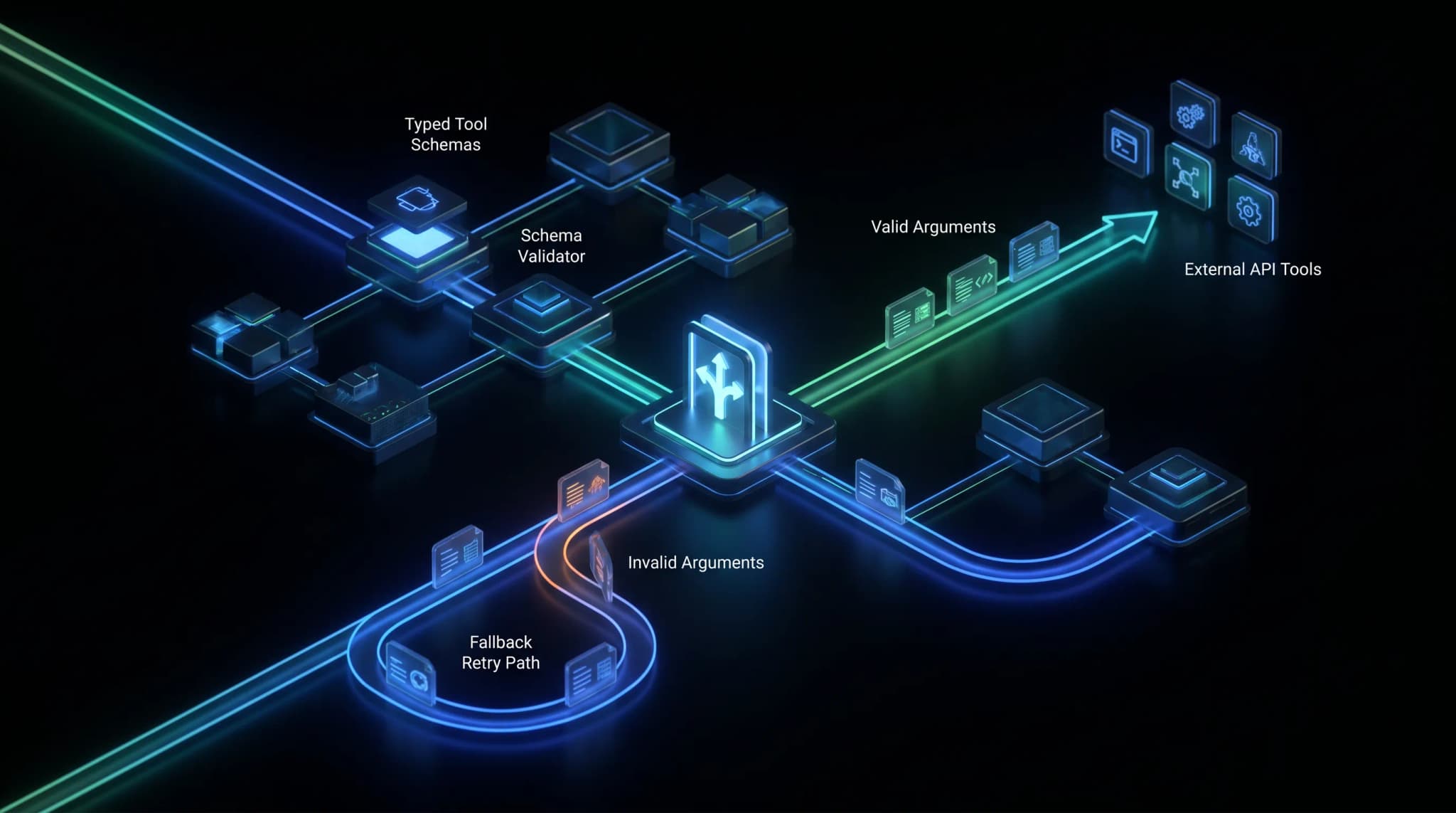
If you are building agents, copilots, or AI workflows, openai compatible tool calling is where the abstraction gets real. Plain text generation is easy to standardize. Tool calling is harder because the model is no longer just answering. It is deciding when to call a function, which function to call, what arguments to pass, and how to recover when the tool result changes the next step.
That is why teams often discover a gap between “this provider supports an OpenAI-compatible API” and “this provider behaves the same way under tool pressure.” The request may look familiar: tools, tool_choice, function names, JSON schemas. But the runtime behavior can still differ across GPT, Claude, GLM, and other models. One model may call a tool eagerly. Another may avoid the tool unless the prompt is explicit. A third may produce almost-correct JSON that fails your validator. The syntax is compatible; the behavior still needs engineering.
This guide explains how to design OpenAI-compatible tool calling for production: schema design, provider differences, fallback paths, validation, observability, and the code structure that lets one application use many models without turning every tool call into a special case.
Why OpenAI-Compatible Tool Calling Is Different From Chat
OpenAI-compatible chat completion is mostly about normalizing inputs and outputs. You send messages. You get text. Tool calling adds a second contract: the model must return a structured action that your backend is willing to execute.
Tool Calls Are API Boundaries
A tool call is not just model output. It is a proposed API invocation. That means it has the same risks as any other API boundary:
- malformed arguments
- missing required fields
- wrong enum values
- unsafe operations
- duplicate calls after retry
- ambiguous failure recovery
If your app treats tool calls as “just JSON from the model,” it will eventually execute the wrong thing or fail in a way users can see.
Compatibility Does Not Remove Semantic Drift
OpenAI’s tools interface and function calling docs define a clear shape for tool definitions and tool call outputs. Anthropic’s tool use docs describe a similar concept through Claude’s native Messages API. Anthropic’s OpenAI SDK compatibility layer can make some requests look familiar, but compatibility does not guarantee every tool-related behavior maps perfectly.
That distinction matters for teams building on a unified API layer such as the patterns in OurToken Docs. The goal is not to pretend every model calls tools identically. The goal is to put provider-specific behavior behind one application-level contract.
The Production Standard Is Reliability, Not Feature Parity
In production, the question is not “does this model support tool calling?” The better question is:
- Does it call the right tool at the right time?
- Does it emit valid arguments?
- Does it recover from tool errors?
- Does it avoid calling tools when it should answer directly?
- Can we switch models without changing product code?
That is the standard this article uses.
How Tool Calling Works in the OpenAI-Compatible Shape
The basic pattern is straightforward:
- Define tools with names, descriptions, and JSON Schema parameters.
- Send messages plus tools to the model.
- Inspect tool calls in the model response.
- Validate arguments locally.
- Execute the tool.
- Send the tool result back to the model if the workflow needs a final answer.
A Minimal Tool Definition
const tools = [
  {
    type: "function",
    function: {
      name: "lookup_invoice",
      description: "Look up invoice status by invoice ID.",
      strict: true,
      parameters: {
        type: "object",
        properties: {
          invoice_id: {
            type: "string",
            description: "The invoice identifier shown to the customer."
          }
        },
        required: ["invoice_id"],
        additionalProperties: false
      }
    }
  }
];
This looks simple, but it contains most of the reliability surface. The name must be stable. The description must be specific. The schema must be strict enough to protect the backend without becoming so complex that models miss it.
For OpenAI-style tool calling, use strict schemas where supported. strict: true makes the model adhere more closely to the declared parameters, which reduces downstream repair logic. For Claude through an OpenAI-compatible SDK path, test this carefully: Anthropic’s compatibility documentation notes that some OpenAI-specific settings, including strict, may be ignored. If strict schema adherence is mission-critical, compare the compatibility path with Claude’s native tool use API before production rollout.
A Minimal OpenAI-Compatible Call
import OpenAI from "openai";

const client = new OpenAI({
  apiKey: process.env.OPENAI_API_KEY,
  baseURL: process.env.OPENAI_BASE_URL
});

const response = await client.chat.completions.create({
  model: "gpt-5.5",
  messages: [
    {
      role: "system",
      content: "Use tools when you need account or invoice data."
    },
    {
      role: "user",
      content: "Can you check why invoice inv_123 is still pending?"
    }
  ],
  tools,
  tool_choice: "auto",
  parallel_tool_calls: false
});

const toolCalls = response.choices[0].message.tool_calls ?? [];
This works as a starting point. It is not enough for production.
Where the Bugs Usually Appear
The fragile part is not sending tools. It is everything after that:
- parsing arguments safely
- validating with the same schema your backend trusts
- preventing duplicate side effects
- handling tool errors as model context
- deciding when to retry on a stronger model
Tool calling is where an AI app becomes a distributed system. Treat it that way.
OpenAI vs Claude vs GLM: What Changes Across Models
The interfaces are similar enough to unify, but not similar enough to ignore differences.
| Area | OpenAI-style tool calling | Claude tool use | Multi-model implication |
|---|---|---|---|
| Tool definition | Function schema in tools | Tool schema in native Messages API | Keep an internal tool registry and compile per provider |
| Tool choice | auto, none, required or named tool modes | Native controls vary by API path | Do not assume identical forcing behavior |
| Argument format | JSON string or structured tool call fields depending on API | Structured tool input blocks | Normalize before execution |
| Parallel calls | Supported in OpenAI-style flows on capable models | Provider and model dependent | Make parallelism an adapter capability |
| Error recovery | App sends tool result or error back as context | App sends tool result/error back as content | Standardize error envelopes |
The point is not that one provider is “better.” The point is that tool calling has runtime semantics. A unified provider catalog such as OurToken Models is useful because it reduces integration sprawl, but your app still needs a tool-calling adapter that understands model behavior.
OpenAI: Strong Schema Discipline
OpenAI’s function calling guidance emphasizes clear function definitions and JSON Schema parameters. For structured workflows, OpenAI also supports stronger schema-constrained patterns through Structured Outputs, which can improve reliability when the final answer must be machine-readable.
For tool calling, the key engineering habit is to keep the schema small and explicit:
- short function names
- concrete descriptions
- strict enum values
- required fields only where truly required
additionalProperties: falsewhen supported
Claude: Excellent Tool Use, Different Native Shape
Claude’s native tool use interface is strong, but it is not simply OpenAI syntax wearing a different model name. Claude uses content blocks and tool use blocks in its native Messages API. If you use an OpenAI-compatible layer for Claude, test whether the compatibility path preserves the tool behavior your app needs.
This is especially important for routes that depend on high-reliability tool selection. If a support workflow uses Claude for policy interpretation and tool use, compare native behavior against the compatibility path for the specific model, such as Claude Opus 4.8, before rolling it into production.
GLM and Other Models: Useful, but Test Tool Pressure
Models such as GLM 5.2 can be strong choices for high-volume or Chinese-language workflows, but tool calling should still be evaluated under real traffic patterns. Test not only whether the model can call a tool, but whether it calls the right tool with valid arguments after messy user input.
For many teams, the best architecture is route-based: use one model for high-volume extraction, another for complex reasoning, and a stronger fallback when tool calls fail validation.
A Production Architecture for Reliable Tool Calling
The right design has four layers:
Application Route
    |
    v
Tool Calling Adapter
    |
    +--> Tool Registry
    |
    +--> Provider Compiler
    |
    +--> Argument Validator
    |
    +--> Tool Executor
    |
    +--> Fallback Policy
    |
    v
Final Model Response
The adapter is the important part. Your feature code should not know how each provider represents tool calls. It should know your internal tool contract.
Layer 1: Tool Registry
Keep every tool definition in one registry. The registry should include:
- internal name
- provider-safe name
- description
- JSON Schema
- idempotency rules
- permission requirements
- side-effect level
That last field matters. A read-only tool such as lookup_invoice can be retried more freely than a side-effect tool such as issue_refund.
Layer 2: Provider Compiler
The provider compiler converts your internal tool definition into the format expected by the selected model provider.
type ToolDefinition = {
  name: string;
  description: string;
  schema: Record<string, unknown>;
  sideEffect: "none" | "low" | "high";
};

function compileToolsForOpenAI(tools: ToolDefinition[]) {
  return tools.map(tool => ({
    type: "function",
    function: {
      name: tool.name,
      description: tool.description,
      parameters: tool.schema
    }
  }));
}

function compileToolsForClaude(tools: ToolDefinition[]) {
  return tools.map(tool => ({
    name: tool.name,
    description: tool.description,
    input_schema: tool.schema
  }));
}
This is where many teams go wrong. They store OpenAI-shaped tools as the source of truth, then later try to squeeze Claude, GLM, or other providers into that exact shape. The better pattern is internal first, provider second.
Layer 3: Argument Validation
Never execute model-supplied arguments without local validation.
import Ajv from "ajv";

const ajv = new Ajv({ allErrors: true });

function validateToolArgs(tool: ToolDefinition, args: unknown) {
  const validate = ajv.compile(tool.schema);
  const ok = validate(args);

  if (!ok) {
    return {
      ok: false,
      errors: validate.errors
    };
  }

  return { ok: true, value: args };
}
This validation step should exist even if the provider claims strong schema adherence. The provider validates shape. Your app validates execution safety.
Layer 4: Fallback Policy
Tool calling needs a fallback policy because failures are not all equal.
| Failure | Example | Best response |
|---|---|---|
| Invalid arguments | Missing invoice_id | Ask same model to repair once |
| Wrong tool | Calls refund when lookup was needed | Retry with stricter prompt or stronger model |
| Tool timeout | Billing API unavailable | Return graceful final answer or queue retry |
| Unsafe side effect | Attempts refund without confirmation | Block and require user confirmation |
| Repeated invalid calls | Same bad schema twice | Escalate to fallback model or human review |
The fallback path is also where a unified model layer creates real value. If one model repeatedly fails argument validation, route the same normalized request to a stronger model without rewriting the feature. That is the practical value of an OurToken unified API platform.
A Working Tool Calling Loop
Below is a compact but production-shaped loop. It handles one tool call, validates arguments, executes the tool, and sends the result back to the model.
function safeParseToolArgs(raw: string) {
  try {
    return { ok: true, value: JSON.parse(raw) };
  } catch (error) {
    return {
      ok: false,
      errors: [
        {
          message: "Tool arguments were not valid JSON.",
          detail: error instanceof Error ? error.message : String(error)
        }
      ]
    };
  }
}

async function runToolWorkflow(userInput: string) {
  const toolRegistry = [lookupInvoiceTool];
  const openaiTools = compileToolsForOpenAI(toolRegistry);

  const first = await client.chat.completions.create({
    model: "gpt-5.5",
    messages: [
      {
        role: "system",
        content: "Use tools only when external data is required."
      },
      {
        role: "user",
        content: userInput
      }
    ],
    tools: openaiTools,
    tool_choice: "auto",
    parallel_tool_calls: false
  });

  const message = first.choices[0].message;
  const call = message.tool_calls?.[0];

  if (!call) {
    return message.content;
  }

  const tool = toolRegistry.find(item => item.name === call.function.name);
  if (!tool) {
    throw new Error(`Unknown tool: ${call.function.name}`);
  }

  const parsedArgs = safeParseToolArgs(call.function.arguments);
  if (!parsedArgs.ok) {
    return retryWithValidationError(userInput, tool, parsedArgs.errors);
  }

  const validation = validateToolArgs(tool, parsedArgs.value);

  if (!validation.ok) {
    return retryWithValidationError(userInput, tool, validation.errors);
  }

  const result = await executeTool(tool, validation.value);

  const final = await client.chat.completions.create({
    model: "gpt-5.5",
    messages: [
      {
        role: "system",
        content: "Use the tool result to answer the user concisely."
      },
      {
        role: "user",
        content: userInput
      },
      message,
      {
        role: "tool",
        tool_call_id: call.id,
        content: JSON.stringify(result)
      }
    ]
  });

  return final.choices[0].message.content;
}
This example intentionally keeps provider-specific compilation outside the workflow. The loop should not care whether the selected backend is OpenAI, Claude, or GLM. The adapter should care.
Cost and Reliability Tradeoffs
Tool calling adds cost in three ways:
- Larger prompts because tool schemas are included.
- Extra model turns when the tool result needs synthesis.
- Extra retries when arguments fail validation.
That does not mean tool calling is expensive by default. It means tool calling needs observability.
The Cost Model
| Cost driver | What causes it | How to reduce it |
|---|---|---|
| Tool schema tokens | Large descriptions and many tools | Send only tools relevant to the route |
| Extra model turns | Tool result requires final response | Use smaller synthesis model when safe |
| Validation retries | Weak schema or ambiguous prompt | Tighten schema and examples |
| Wrong tool calls | Too many overlapping tools | Split tool groups by route |
| Strong-model fallback | Cheap model fails under tool pressure | Route only failed calls upward |
The simplest win is tool pruning. If a billing route only needs invoice tools, do not send the CRM, calendar, search, and refund tools too. Smaller tool menus reduce tokens and improve tool selection.
Reliability Metrics to Track
Track these by model, route, and tool:
- tool-call rate
- correct-tool rate
- argument-valid rate
- tool execution error rate
- retry rate
- fallback rate
- final user resolution rate
If you only track token spend, you will miss the real issue. A cheap model with a 12% invalid-argument rate may cost more than a stronger model with a 1% invalid-argument rate once retries and support failures are included.
Common Mistakes in Multi-Model Tool Calling
Mistake 1: Sending Every Tool to Every Route
More tools can make the model worse. A support triage route does not need a refund tool until the user has passed a confirmation step. Reduce the menu before blaming the model.
Mistake 2: Using Provider Schema as the Source of Truth
If OpenAI-shaped tools are your canonical registry, every other provider becomes an adapter hack. Keep an internal tool definition and compile outward.
Mistake 3: Trusting the Model to Validate Business Rules
The model can select a tool and fill arguments. It should not decide whether a refund is allowed, whether an account is eligible, or whether a user has permission. Those checks belong in your backend.
Mistake 4: Retrying Side Effects Without Idempotency
Read tools can often retry safely. Write tools need idempotency keys, confirmation gates, or both. Never let a model retry a payment, refund, or account mutation without backend protection.
Mistake 5: Measuring “Tool Supported” Instead of “Tool Reliable”
A model passing one demo call means almost nothing. Test messy input, missing fields, conflicting instructions, tool errors, and multi-turn repair.
Conclusion
OpenAI-compatible tool calling is one of the most useful abstractions in AI infrastructure, but it should be treated as an engineering contract, not a magic compatibility flag. The request shape may be familiar across providers, but schema handling, tool selection, parallel calls, and recovery behavior still vary enough to matter.
The winning pattern is to keep your application contract stable and provider-neutral: define tools in an internal registry, compile them per provider, validate arguments locally, execute tools through a controlled backend, and route failures through a clear fallback policy. That lets your product benefit from a unified model layer without pretending every model behaves the same under tool pressure.
For teams building agents or workflow automation, this is where multi-model infrastructure becomes practical. You can choose the right model per route, test tool reliability per provider, and move traffic without rewriting every feature that depends on external actions.
FAQ
Is OpenAI-compatible tool calling the same as OpenAI function calling?
Not exactly. OpenAI-compatible tool calling usually means a provider accepts a similar request shape, but runtime behavior can still differ. You should test tool selection, argument validity, and recovery behavior per provider.
Can Claude use OpenAI-compatible tool calling?
Claude has strong native tool use support, and Anthropic also documents OpenAI SDK compatibility. For production workflows, test both the native Claude path and the compatibility path before assuming they behave the same.
Should I use tool calling or structured outputs?
Use tool calling when the model needs to choose or invoke an external action. Use structured outputs when the model needs to return a fixed machine-readable object. Many agent systems use both.
How do I make tool calls more reliable?
Use fewer route-specific tools, strict schemas, local validation, idempotency for side effects, and fallback models for repeated invalid calls.
What is the biggest production risk?
The biggest risk is executing model-supplied arguments without backend validation. Tool calls should be treated like untrusted API requests until your application validates them.