MCP Server Authentication: API Keys, OAuth, TLS, and Tool-Level Authorization
Learn MCP server authentication for local and remote deployments: protect stdio and Streamable HTTP transports, choose API keys or OAuth, enforce tool-level authorization, and connect the model layer safely.
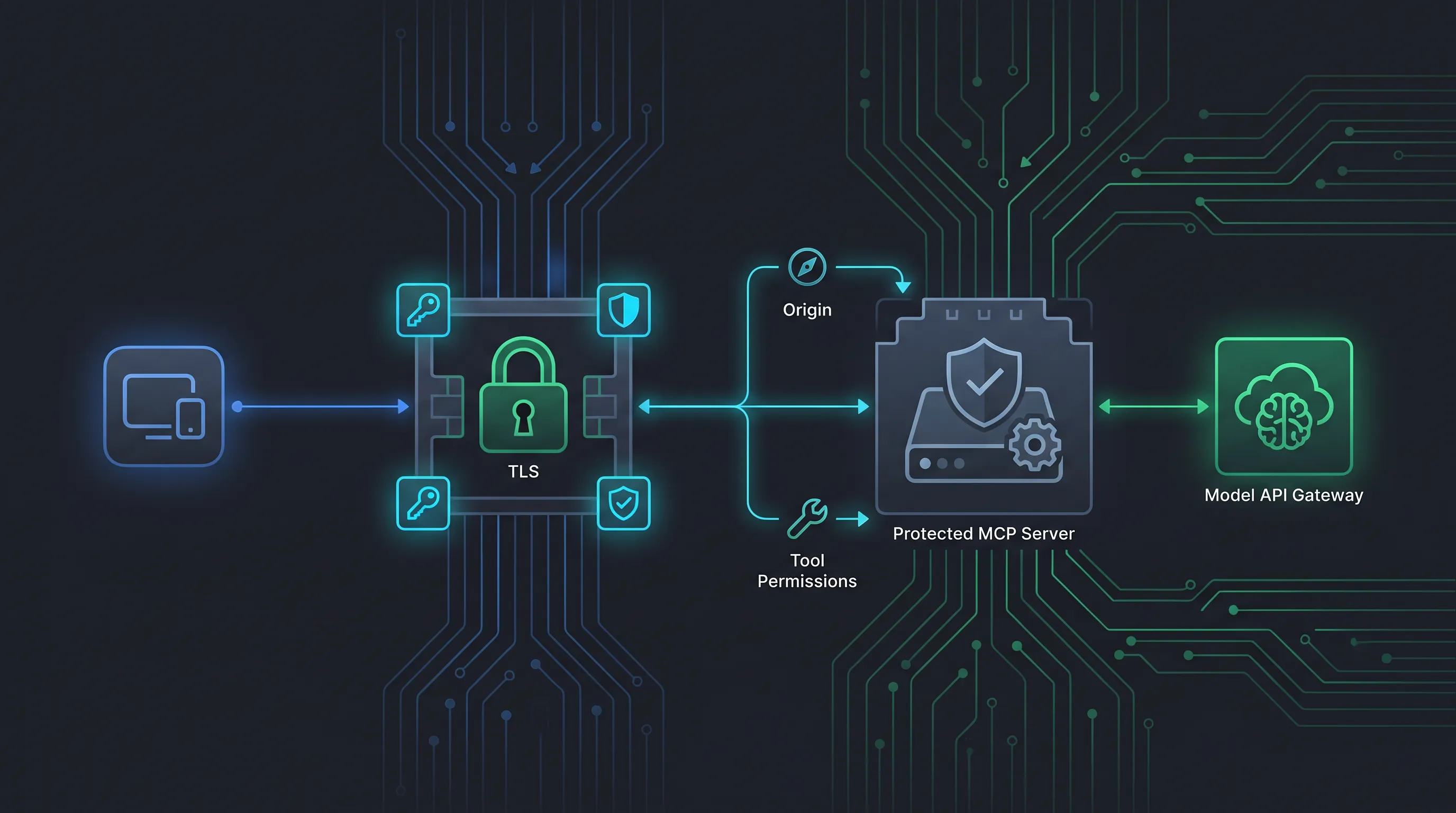
MCP server authentication is the point where a useful prototype becomes a service you can trust. A server that exposes an internal ticket system, repository, analytics database, or deployment tool is not safe merely because it speaks the Model Context Protocol. You still need to identify the caller, decide what that caller may do, protect the transport, and prevent a model from turning a broad tool into an unintended data-access path.
The first distinction is important: MCP authentication protects the connection between an MCP client and an MCP server. It is separate from the model API connection between your application and a provider such as OurToken. A typical system has both:
User -> AI application / MCP client -> MCP server -> internal API
                         |
                         +-> model gateway (OurToken or another provider)
The MCP server owns access to tools and resources. The model gateway owns model requests, keys, model IDs, usage, and routing. Never pass an internal database password or an OurToken API key as a model-visible tool argument.
This guide covers local stdio servers, remote Streamable HTTP servers, API keys, OAuth, TLS, Origin checks, scopes, tool-level authorization, error handling, and a Python implementation pattern. It follows the current MCP authorization specification, the MCP server build guide, and OurToken's public configuration documentation.
Verification note: MCP authorization requirements and transport boundaries were checked on 2026-09-03. The examples are patterns for adaptation, not a claim that every MCP host or provider implements every option identically. Test your selected client, SDK, and deployment platform before production rollout.
MCP Server Authentication Boundaries
Authentication answers “who is calling?” Authorization answers “what may that caller do?” Transport security answers “can someone read or alter the exchange?” These controls work together but should not be collapsed into one middleware function.
Three identities to keep separate
A production request can involve three distinct identities:
| Identity | Where it is authenticated | What it controls |
|---|---|---|
| Human or application user | Your login, session, or service identity | Which workspace and data the user may access |
| MCP client | stdio process ownership or HTTP access token | Which MCP server connection is trusted |
| Model provider client | OurToken or provider API key | Which model routes and budget the application may use |
For a local stdio integration, the MCP host often launches the server as a child process. The process boundary and the operating-system user provide a useful baseline, and the MCP specification says HTTP authorization should not simply be applied to stdio. Read credentials from the environment or a platform secret store instead.
For a remote HTTP server, the MCP client is an OAuth client and the protected MCP server acts as a resource server when authorization is enabled. The authorization server issues access tokens. The current specification requires protected-resource metadata so clients can discover the authorization server, and it defines discovery through a WWW-Authenticate challenge or well-known metadata URI.
The model provider is still a different hop. An MCP access token does not authenticate a request to OurToken, and an OurToken API key does not authorize a caller to use an MCP tool. Keep those credentials in the process that owns the corresponding boundary.
Threat model before implementation
Write down what you are protecting before choosing a credential format:
- A local developer tool reading files in one workspace
- A shared remote MCP service used by several teams
- A read-only reporting tool with sensitive customer data
- A deployment tool that can change production state
- A model-generated request influenced by untrusted prompt content
- A compromised client or stolen token
The same MCP server authentication example is not appropriate for all of these. A local read-only server may need an environment variable and OS permissions. A remote deployment server needs TLS, short-lived tokens, audience validation, scopes, audit logs, confirmation for dangerous actions, and a kill switch.
Choose API Keys, OAuth, or a Service Identity
There is no universal best credential. Choose the smallest mechanism that matches the deployment and risk, then make rotation and revocation routine.
API keys for controlled server-to-server calls
An API key is a long-lived secret that identifies an application or service. It is simple to send as a Bearer token:
Authorization: Bearer mcp-service-key
Keys are practical for an internal service where the caller is a known backend and there is no interactive user consent flow. Store them in a secret manager, restrict their scope, rotate them, and never include them in a tool argument or log line.
A key does not automatically tell you which human triggered a tool call. If your application serves multiple users, authenticate the user separately and attach a server-side subject or tenant ID to the MCP authorization decision. Do not trust a user ID supplied by the model.
OAuth for remote, user-authorized MCP access
OAuth is the better fit when an MCP client acts on behalf of a user or when clients are operated by parties you do not manage centrally. The current MCP authorization specification describes HTTP-based authorization using OAuth 2.1 concepts. In that flow:
1. Client calls the protected MCP endpoint without a token.
2. Server returns 401 and resource metadata guidance.
3. Client discovers the authorization server.
4. Client obtains an access token with the required scopes.
5. Client calls the MCP server with the token.
6. Server validates issuer, audience, expiry, and scopes.
The server should request the narrowest scopes needed for the current operation. A read-only tool might need tickets:read; a deployment tool should not receive tickets:write merely because the same client can discover both tools.
The MCP specification requires protected-resource metadata and authorization-server discovery for HTTP authorization. Follow the current specification instead of hard-coding one vendor's OAuth URL. Authorization servers may be separate from the MCP server, and clients should validate issuer information before accepting an authorization response.
Service identities and workload credentials
For a backend-to-backend deployment, a workload identity can be safer than copying a static key between machines. Examples include a cloud identity, mTLS client certificate, or short-lived token minted for a specific service account. The exact mechanism depends on your platform, but the policy is consistent:
- Bind the identity to one service or environment.
- Issue only the scopes required by its tools.
- Prefer short-lived credentials where practical.
- Revoke or disable the identity without rebuilding the client.
- Log the identity and decision, not the secret.
Do not confuse authentication with authorization. A valid service identity should still be denied if it asks for a tool outside its allowlist or a tenant outside its assignment.
Protect Local stdio MCP Servers
stdio is often the safest starting transport because the client launches the server locally and there is no listening network port. It is not automatically safe: the server still runs with the local user's file and process permissions.
Environment-based credentials
For a local server that needs a backend token, read it from the process environment:
import os


BACKEND_TOKEN = os.environ["TICKETS_API_TOKEN"]
Configure the variable through the host or operating-system secret facility. Do not put a literal token in an MCP client JSON file that is committed to a repository. On Windows PowerShell, set a local value with:
$env:TICKETS_API_TOKEN = "paste-your-key-locally"
A missing environment variable should fail at startup with a clear message written to stderr. Do not print the value while diagnosing a configuration problem.
stdio logging rules
MCP messages use the process streams. For a stdio server, writing ordinary logs to stdout can corrupt the protocol exchange. Use the standard logging module, which writes to stderr by default:
import logging


logger = logging.getLogger(__name__)
logger.setLevel(logging.INFO)
logger.info("ticket server started")
Never log Authorization headers, access tokens, full customer records, or model prompts that may contain secrets. A request ID, tool name, caller identity, and outcome are usually enough to correlate a failure.
Local permissions are still authorization
Run the server under the least-privileged OS account that can perform its job. Restrict filesystem roots, working directories, subprocess permissions, and network egress. If a tool only needs to read a repository, do not give it write access to the entire home directory.
A local MCP server should also declare dangerous behavior clearly in tool descriptions. “Read the current branch status” is safer and easier to approve than “run any shell command.” Keep write operations separate and require an explicit user confirmation in the host application.
Secure Remote Streamable HTTP
Remote MCP servers need a real network security design. Streamable HTTP is a transport, not an authentication product. Put the endpoint behind TLS and an authentication layer, then enforce authorization inside the server.
TLS and host validation
Use HTTPS for every non-local deployment. Validate certificates on the client, terminate TLS at a trusted edge, and do not disable verification to get a prototype working. If your threat model requires mutual authentication, use mTLS or a service mesh policy in addition to application-level tokens.
Validate the host and forwarded headers at the edge. An attacker who can influence routing or proxy headers may be able to bypass an origin policy if the application trusts arbitrary forwarded values. Keep a short allowlist of expected hosts and environments.
Origin and CSRF protection
An HTTP MCP endpoint may be reached by a browser-based client. Validate the Origin header against an explicit allowlist and use CSRF protection appropriate to your session model. Origin checking is not a replacement for authentication: a non-browser client can omit the header, and a compromised allowed origin can still make authorized requests.
For cookie-backed sessions, set Secure, HttpOnly, and SameSite attributes and bind the session to the authenticated user. For bearer tokens, keep tokens out of URLs and browser history; send them in the Authorization header.
OAuth resource-server validation
A resource server should validate at least:
| Claim or check | Why it matters |
|---|---|
| Signature | Token was issued by the trusted authorization server |
| Issuer | Token comes from the expected tenant or authority |
| Audience | Token was meant for this MCP resource |
| Expiry and not-before | Token is currently valid |
| Scopes | Caller may use this operation |
| Subject or tenant | Data access is bound to the right user or workspace |
| Revocation or session state | Disabled identities cannot continue indefinitely |
Do not accept an opaque token merely because it has the right shape. Use the authorization server's introspection or validation mechanism when required by your token format and security model. Cache validation only within a short, documented window.
A 401 response means the client has not presented a valid authentication credential. A 403 response means the credential is understood but lacks permission. Keep those semantics consistent so clients can recover correctly.
Tool-Level Authorization
Server-level authentication is only the first gate. The most important MCP server authentication and authorization practice is to authorize each tool call with the caller, tenant, resource, and operation in context.
Define a capability matrix
Start with an explicit matrix rather than deriving permissions from tool names at runtime:
| Role | tickets:search | tickets:read | tickets:update | deploy:production |
|---|---|---|---|---|
| Support analyst | yes | yes | no | no |
| Support manager | yes | yes | yes | no |
| Release engineer | no | limited | no | staging only |
| Automation service | filtered | filtered | approved queue | approved workflow |
The server should enforce this matrix after authentication and before calling the backend. A model cannot grant itself a scope by placing a field such as role=admin in JSON.
Bind authorization to server-side context
A safe tool function receives the authenticated principal from middleware, not from the model:
from dataclasses import dataclass


@dataclass(frozen=True)
class Principal:
    subject: str
    tenant_id: str
    scopes: frozenset[str]


def require_scope(principal: Principal, scope: str) -> None:
    if scope not in principal.scopes:
        raise PermissionError(f"missing scope: {scope}")


def authorize_ticket_search(principal: Principal, requested_tenant: str | None) -> str:
    require_scope(principal, "tickets:search")
    if requested_tenant and requested_tenant != principal.tenant_id:
        raise PermissionError("tenant boundary violation")
    return principal.tenant_id
The tool may accept filters such as status or priority, but it should not accept an arbitrary tenant ID and trust it. Resolve the tenant from the token or server-side session, then apply the filter. This is the difference between “the model asked for tenant A” and “the authenticated caller is allowed to see tenant A.”
Separate read and write tools
Read and write operations should have different names, scopes, audit events, and confirmation policies. A write tool should validate an idempotency key, require a reason or ticket reference where appropriate, and return a structured result that makes the state change explicit.
For production deployments, consider two MCP servers or two credentials: one for read-only discovery and another for approved mutations. A compromised read-only token should not become a deployment credential through tool reconfiguration.
Authentication Flow Example
The following pseudo-flow shows how a remote client and server interact without tying the design to one OAuth vendor:
Client                         MCP server                 Authorization server
  | -- request without token --> |                            |
  | <-- 401 + metadata -------- |                            |
  | -- fetch resource metadata ------------------------------>
  | <-------------------------- metadata -------------------- |
  | -------------------------------------------------------> discovery
  | <------------------------------------------------------- issuer + endpoints
  | -------------------------------------------------------> authorize + PKCE
  | <------------------------------------------------------- code
  | -------------------------------------------------------> token exchange
  | <------------------------------------------------------- access token
  | -- MCP request + Bearer --> |                            |
  | <-- tool list / result ---- |                            |
The server should advertise the resource metadata URL through a WWW-Authenticate challenge or a well-known protected-resource URI. The client should validate the authorization-server metadata, use PKCE for a public client, validate the issuer in the callback, and request only the scopes needed for the current operation.
For an internal service with pre-provisioned identities, you can simplify the interactive portion by using a service credential. Keep the same resource-server checks: audience, issuer, expiry, scopes, tenant, and revocation policy.
Connect the Model Layer Without Leaking Credentials
MCP authentication protects the tool connection. Your model client still needs its own API credential. If you use OurToken as an OpenAI-compatible gateway, create a key through the OurToken API Keys page and set the SDK base URL to the API root:
import os

from openai import OpenAI


model_client = OpenAI(
    api_key=os.environ["OURTOKEN_API_KEY"],
    base_url=os.getenv("OURTOKEN_BASE_URL", "https://api.ourtoken.ai/v1"),
)
The model gateway key belongs in the application process, not in the MCP tool schema. The MCP server's backend key belongs in the server process. Keep the two secrets separate so rotating or revoking one does not silently grant access to the other.
For current model IDs and route capabilities, use the live OurToken model catalog. The catalog is also a useful place to confirm which model route your client can use for tool calling. Do not assume that every OpenAI-compatible route supports identical tool-call behavior or rate limits.
A safe application loop looks like this:
1. Authenticate the user or service.
2. Connect to the MCP server with the correct transport credential.
3. Discover tools and retain their schemas.
4. Pass only authorized tools to the model.
5. Validate model-generated arguments again on the server.
6. Execute the tool with server-side tenant and scope context.
7. Return a bounded, redacted result to the model.
8. Record the decision, latency, and outcome.
Never give the model a generic “call any endpoint” tool. The model should choose from an allowlisted set, while the server remains the final policy enforcement point.
Error Handling and Incident Diagnosis
Clear HTTP and tool errors make authentication failures recoverable instead of mysterious. Do not expose token-validation internals or stack traces to the model or end user.
| Symptom | Meaning | Action |
|---|---|---|
| 401 from MCP endpoint | Missing, expired, invalid, or wrong-audience credential | Re-authenticate or fix token configuration |
| 403 from MCP endpoint | Valid identity lacks scope, tenant, or tool permission | Request the correct scope or change policy |
| 404 on HTTP route | Wrong MCP path, proxy, or transport configuration | Verify the deployed endpoint and client transport |
| 429 from MCP or backend | Rate limit or concurrency budget | Honor Retry-After, reduce concurrency, queue work |
| Tool not discovered | Server startup, handshake, or capability problem | Inspect server logs and protocol negotiation |
| Tool discovered but call denied | Authorization matrix rejected the principal | Check subject, tenant, scope, and tool policy |
| Model API 401 | OurToken or provider key is missing or invalid | Fix model-client credentials separately |
| Model API model-not-found | Wrong model ID for the gateway | Verify the live OurToken catalog or runtime model list |
| Tool result ignored by model | Conversation assembly or schema mismatch | Preserve the tool call/result pairing and validate schema |
Keep an incident record with timestamp, request ID, principal subject, server, tool, decision, status code, and latency. Redact bearer tokens, API keys, raw authorization headers, and sensitive payloads. A useful audit log can answer “who attempted what and why was it allowed?” without becoming a copy of the customer's database.
Testing MCP Server Authentication
Authentication code needs tests at the protocol, policy, and integration layers. A successful local call is not evidence that a remote server is secure.
Unit and policy tests
Test the authorization matrix with synthetic principals:
import pytest


def test_search_requires_scope():
    principal = Principal(
        subject="user-1",
        tenant_id="tenant-a",
        scopes=frozenset(),
    )
    with pytest.raises(PermissionError):
        authorize_ticket_search(principal, None)


def test_cannot_cross_tenant_boundary():
    principal = Principal(
        subject="user-1",
        tenant_id="tenant-a",
        scopes=frozenset({"tickets:search"}),
    )
    with pytest.raises(PermissionError):
        authorize_ticket_search(principal, "tenant-b")
Add tests for expired tokens, wrong issuer, wrong audience, missing scope, disabled subjects, malformed arguments, oversized results, and backend timeouts. For write tools, test duplicate requests and idempotency behavior.
Integration and adversarial tests
Use a staging authorization server or a signed test-token fixture. Verify that the server returns 401 before authentication, 403 after authentication but before authorization, and a bounded tool error for backend failures. Test Origin allowlists through the same proxy path used in production.
Include adversarial cases:
- A model argument that contains a different tenant ID
- A tool description that tries to request an admin scope
- A prompt containing an instruction to reveal a token
- A valid token sent to the wrong MCP audience
- A token that expires while a long tool call is running
- A result containing fields the server should redact
- A client that requests an undeclared tool
The model is not a trusted policy engine. Treat all model-generated arguments and all tool-returned text as untrusted data.
Cost, Performance, and Operations
Authentication adds work, but the operational cost is usually smaller than the cost of an unauthorized tool call or a leaked credential. Measure it rather than disabling controls when latency rises.
Track:
- Token validation latency and cache hit rate
- Authentication failures by reason
- Authorization denials by tool and scope
- Tool-call latency and backend latency separately
- Result size and redaction counts
- 429 responses and retry amplification
- Model input and output tokens after tool results
- Cost per successful, authorized answer
Keep tool results small. Returning hundreds of database rows increases model input tokens and expands the data exposed to the model. Return IDs and concise summaries, then require a separate authorized detail call. OurToken's LLM model routing guide can help route simple lookups to a lower-cost verified model and reserve stronger routes for complex investigations.
If repeated system instructions and tool schemas are stable, prompt caching may reduce eligible input cost when the selected route supports it. The OurToken prompt caching guide explains how to account for cached tokens. Do not put secrets in a cached prompt prefix; caching does not make sensitive content safe to disclose.
For remote servers, use health checks that do not expose protected data, alert on sustained 401/403 spikes, and maintain a credential-rotation runbook. For local servers, document how to revoke environment credentials and disable the host configuration. Keep an emergency switch that disables dangerous tools without deleting the entire server.
Production Checklist
Before exposing an MCP server beyond a single developer machine, confirm:
[ ] Transport is chosen deliberately: stdio for local process, HTTP for remote service
[ ] stdio credentials come from the environment or OS secret store
[ ] stdio logs never write protocol-breaking data to stdout
[ ] Remote HTTP runs behind TLS with certificate verification
[ ] Host and Origin validation use explicit allowlists
[ ] OAuth resource metadata and authorization-server discovery follow the current MCP spec
[ ] Tokens validate issuer, audience, signature, expiry, scopes, and subject/tenant
[ ] 401 and 403 responses have consistent semantics
[ ] Every tool has an explicit allowlist and scope requirement
[ ] Tenant and resource context come from the authenticated principal
[ ] Read and write tools use separate permissions and audit events
[ ] Dangerous mutations require confirmation and safe retries
[ ] Tool results are bounded, redacted, and schema-validated
[ ] MCP credentials and model-provider credentials are stored separately
[ ] OurToken model IDs are verified against the live catalog
[ ] Rate limits, retries, queueing, and circuit breakers are bounded
[ ] Authentication and authorization decisions are observable without logging secrets
[ ] Unit, integration, and adversarial tests run before deployment
[ ] A kill switch and credential-revocation procedure are documented
Treat the checklist as a release gate. If one item is unknown, record the assumption and test it in staging rather than relying on a model prompt to compensate for a missing control.
Conclusion and FAQ
MCP server authentication is a layered design: protect the transport, authenticate the caller, authorize each tool, bind requests to the correct tenant, and keep model-provider credentials on their own boundary. For local stdio servers, use environment or OS-managed credentials and keep stdout reserved for protocol messages. For remote Streamable HTTP, use TLS, explicit Origin and host policies, OAuth resource-server validation, scopes, and protected-resource metadata discovery.
Start with a read-only tool and synthetic data. Add write operations only after you have a capability matrix, confirmation flow, idempotency policy, audit trail, and revocation plan. When the application also calls OurToken, configure the model client separately with an API key and the OpenAI-compatible base URL https://api.ourtoken.ai/v1, then verify model IDs in the live catalog. MCP decides what the application may access; the model API decides how the application generates an answer. Keeping those responsibilities separate is the security feature.
FAQ
What is MCP server authentication?
It is the process of verifying an MCP client's identity before allowing it to access a protected MCP server. Authorization then decides which tools, resources, tenants, and operations that identity may use.
Should a local stdio MCP server use OAuth?
Usually not. The current MCP authorization specification is for HTTP-based transports and says stdio implementations should instead retrieve credentials from the environment. Use OS permissions and least privilege for local processes.
When should I use an API key?
Use an API key for a controlled server-to-server connection where the caller is a known application and an interactive user-consent flow is unnecessary. Store it in a secret manager, scope it narrowly, rotate it, and never log it.
When should I use OAuth for MCP?
Use OAuth when a remote MCP client acts on behalf of a user or when clients are not centrally managed. Implement protected-resource metadata, authorization-server discovery, token validation, scopes, and issuer/audience checks according to the current MCP specification.
What is the difference between 401 and 403 for MCP?
401 means the request lacks a valid authentication credential. 403 means the server understands the identity but the identity is not allowed to perform the requested operation.
How do I secure MCP Streamable HTTP?
Use HTTPS, validate certificates, authenticate every request, validate host and Origin headers, enforce OAuth or another documented token policy, apply tool-level scopes, rate-limit calls, and keep results bounded and redacted.
Can the model decide whether a tool is authorized?
No. The model may choose a tool, but the MCP server must enforce authorization from the authenticated principal, scopes, tenant, resource, and operation. Model-generated arguments are untrusted input.
How do I connect MCP to OurToken securely?
Keep MCP credentials in the MCP client/server boundary and keep the OurToken API key in the model-client process. Use https://api.ourtoken.ai/v1 as the OpenAI SDK base URL, verify the model ID in the live catalog, and never pass either credential as a tool argument.
How can authentication affect token cost?
Authentication itself is usually a small overhead. The larger cost comes from oversized tool results that become model input. Cap result counts, return summaries, and use a separate authorized detail operation.